
Clothing, footwear and accessories
360° virtual tour for clothing and shoe storesYour window display, but the whole store.
A 360° tour of your shop. Every rack and every shelf is a point with garments, prices, sizes and stock; the customer reserves on WhatsApp.
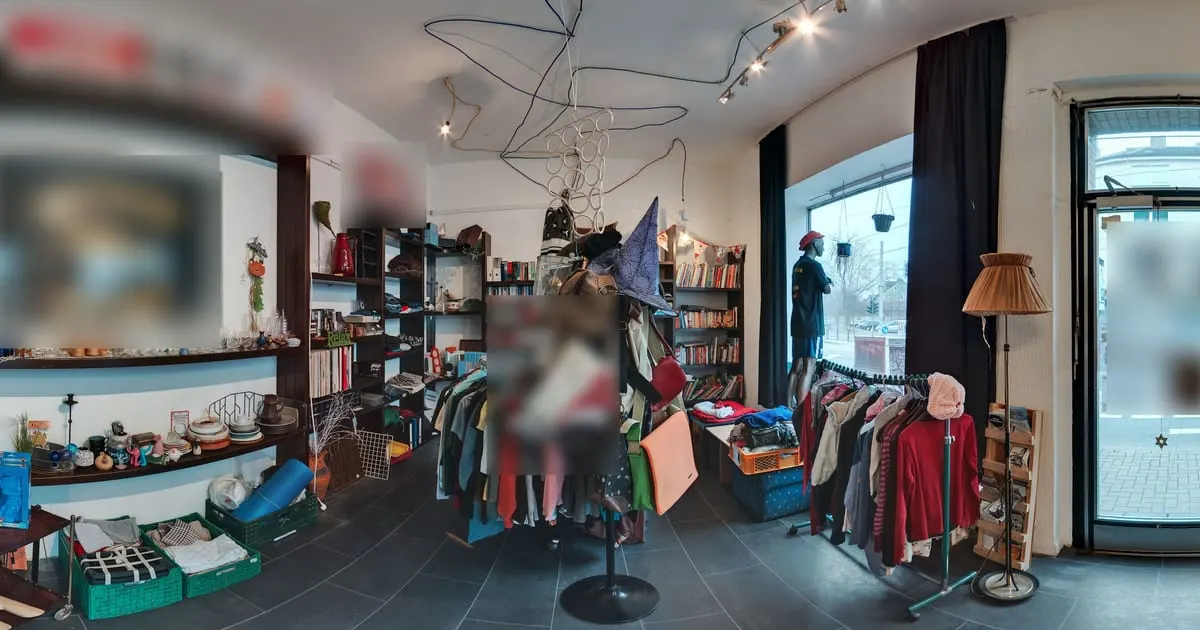
What a 360° virtual tour for clothing stores is
A 360° virtual tour for clothing stores is your shop photographed in panoramas so the customer walks it on their phone as if coming through the door. Every rack, mannequin or shelf is a point that opens that section's garments with photo, price, available sizes and stock, and from there the customer reserves the garment or asks on WhatsApp.
Collections change, the store doesn't: you update the garments in the catalog and only take new photos when you rearrange the shop.
What your clothing store gains
- 01
You sell the full collection
Instagram shows one garment at a time. The tour shows the whole store with prices and sizes.
- 02
Fewer "do you have it in M?"
Price, sizes and stock are on every point. The chat that arrives is to reserve.
- 03
New collection in a day
Photograph the store when the season changes and update garments and prices from the dashboard.
- 04
One link for social media and QR
Instagram bio, WhatsApp statuses and the QR on the window lead to the same tour.
How it works for clothing stores
- 1
Photograph the store
Entrance, women's, men's, footwear, fitting rooms. With the ViewNexo 360 app in an hour.
- 2
Connect the sections
Points that lead from the entrance to each section, the way the customer would walk.
- 3
Put a shelf on every rack
Each rack or table is a shelf with its garments, price, sizes and stock.
- 4
Turn on WhatsApp
The message arrives with the garment they were looking at. Publish and share.
What to photograph in your clothing store
Each scene of the tour is a 360° photo of one space. These are the ones worth having, in the order a visitor would walk them.
- 01
Window and entrance
What people see from the street, with the season's mannequins.
- 02
Women's section
Racks and tables, with one point per type of garment.
- 03
Men's section
Same as above: shirts, trousers and coats kept apart.
- 04
Footwear and accessories
The wall of shoes, bags and belts.
- 05
Fitting rooms
Photographed empty and tidy; they show what shopping in the store is like.
- 06
Checkout and counter
With the WhatsApp point and payment methods in an information point.
The interactive points for clothing stores
Every scene of the tour takes points the visitor taps. These are the ones businesses in this industry use most.
- Smart shelf
Rack by rack
Garments with price, available sizes and stock, updated from the dashboard.
- WhatsApp
Reserve on WhatsApp
The chat opens with the garment's name; the customer asks for size and payment.
- Scene link
Walk the sections
Women's, men's, footwear, accessories connected like in the shop.
- External link
Online store
If you sell online, each garment can link to its purchase page.
- Information
Hours and shipping
Hours, shipping and returns on a fixed point near the entrance.
What it costs: an example on the Starter plan
A clothing store with a window, two sections, footwear and fitting rooms fits in 5 or 6 scenes. The Free plan lets you try it for 3 months with 1 tour of up to 10 scenes and 10 products, enough for a seasonal window. To show the collection, the Starter plan ($19 a month) takes 50 products and tours of up to 15 scenes, and the Professional plan ($39 a month), 500 products and 3 locations if you have more than one shop.
Prices in US dollars (USD), per month.
See plans and pricingFrequently asked questions
Do I have to photograph every garment?
You photograph the store in 360° once; each garment carries its own product photo, the same one you use on social media.
How do I handle sizes and stock?
Each product has stock and a description; put the available sizes there and update them from the dashboard or the app.
What happens when I change the collection?
Photograph the store again, or just the area that changed, and replace the garments on the shelves.
Can I take payment from the tour?
The order arrives on WhatsApp and you charge as usual. If you have an online store, link each garment to its page.
Does it work for small boutiques?
Yes. The free plan covers one shop with several scenes and its products.
Related industries
Other kinds of business that use the 360° virtual tour in a similar way.
- 360° virtual tour for shops and retailAny store with shelves: customers walk, tap the products and buy on WhatsApp.
- 360° virtual tour for phone storesCustomers see the devices with price and stock, and book the repair without calling.
- 360° virtual tour for furniture stores and showroomsCustomers walk the showroom room by room, tap each piece and see price and dimensions.
Pricing
The first 3 months are free, no card needed. Move to a paid plan once your tour is bringing in customers; compare each plan’s limits on the pricing page.
Want to see it with your clothing store?
Message us on WhatsApp and we’ll tell you how businesses like yours do it, or create your account and publish your first tour today.