
Hotels, inns and lodgings
360° virtual tour for hotels and innsThe exact room, before they pay.
A 360° tour through reception, rooms, pool and restaurant. Each room type shows its rate and the booking button opens your WhatsApp.
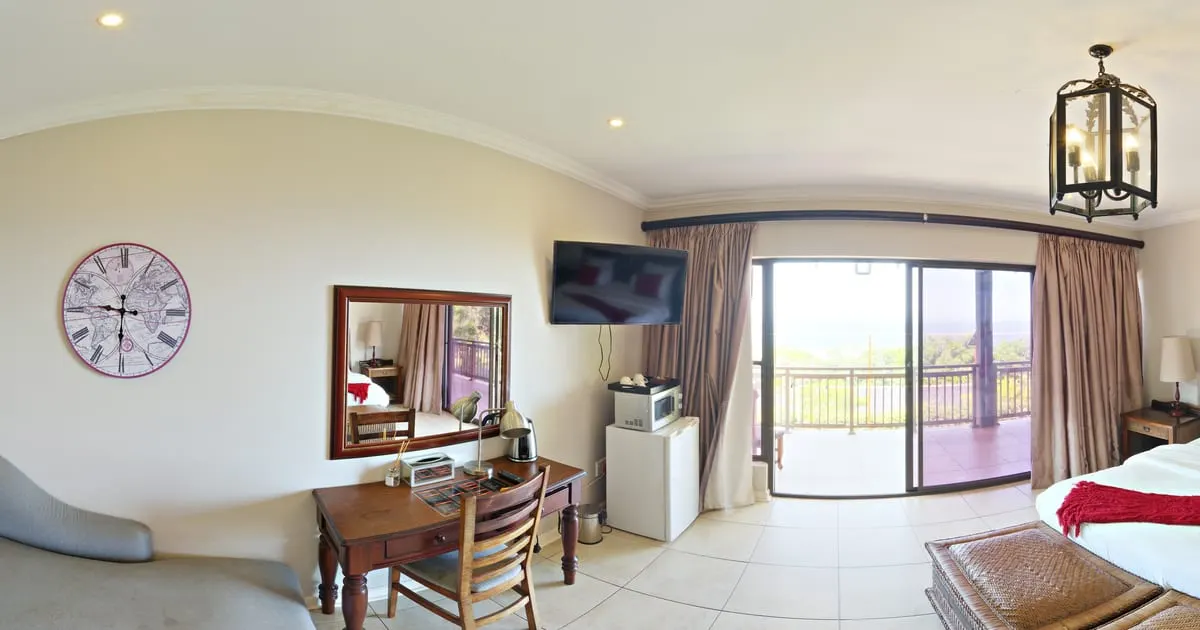
What a 360° virtual tour for hotels is
A 360° virtual tour for hotels is a walk through the property made of panoramic photos that the guest opens in their phone's browser, with nothing to install. It starts at reception, goes into each room type, looks out at the pool and the breakfast room, and in each space there are points with the nightly rate, what's included and the button to book on WhatsApp.
It works the same for a six-room inn as for a hotel with event halls: what changes is the number of scenes.
What your hotel gains
- 01
Fewer doubts, more direct bookings
Someone who already walked the room and saw the view books with you instead of going back to the search engine.
- 02
Rates where they are seen
Rooms, suites and services as smart shelves with a nightly price you update by season.
- 03
Events and weddings with one link
Show the hall, the garden and the real capacity; receive the quote request with dates and guest count.
- 04
Trust against the booking sites
A real walk-through weighs more than retouched photos: the guest knows exactly what they get.
How it works for hotels
- 1
Photograph the key areas
Reception, one room of each type, pool, breakfast room, gym and the view you sell.
- 2
Connect the spaces
Points that lead from reception to the hallway and to each room, the way the bellhop would.
- 3
Add rates and services
Each room type is a product with price and description. Spa, transfers and breakfast go on their own shelf.
- 4
Publish and share
Link on your website, on Google Business and in your WhatsApp auto-reply. Bookings arrive with dates and guests.
What to photograph in your hotel
Each scene of the tour is a 360° photo of one space. These are the ones worth having, in the order a visitor would walk them.
- 01
Reception and lobby
The starting point, with check-in times in an information point.
- 02
One room of each type
Single, double, family, suite: one scene per type, with its rate.
- 03
The room's bathroom
A common question before booking; one scene answers it.
- 04
Pool and common areas
Pool, garden, terrace or lounge.
- 05
Breakfast room or restaurant
With the hours and what breakfast includes.
- 06
The view
Balcony, lookout or beachfront: what the guest is coming for.
- 07
Event hall
If you host weddings or meetings, with the quote point.
The interactive points for hotels
Every scene of the tour takes points the visitor taps. These are the ones businesses in this industry use most.
- Smart shelf
Room types
Standard, double, suite: each with nightly rate, capacity and what's included.
- Booking
Book a stay
Check-in, check-out, guests and contact, straight to your inbox or WhatsApp.
- Scene link
Walk the hotel
From reception to the hallway, to the room and to the terrace with the view.
- Quote
Quote events
Weddings, conventions and groups ask for a quote from the hall they like.
- External link
Booking engine
If you already use a booking engine, a point can send the guest there with the chosen room.
What it costs: an example on the Starter plan
An inn with reception, three room types, a pool, a breakfast room and a view takes about 8 scenes: it fits in the 10 of the Free plan, free for 3 months, with 10 products for rates and services. A hotel with more room types, a spa and an event hall fits the Starter plan ($19 a month): 3 tours of up to 15 scenes and 50 products. With several properties, the Professional plan ($39 a month) covers 3 locations and 5 tours of up to 30 scenes.
Prices in US dollars (USD), per month.
See plans and pricingFrequently asked questions
Can I show several rooms of the same type?
Photographing one per type is enough. If every room is different (cottages, boutique), photograph each one and link them from the hallway.
How do I handle seasonal rates?
Edit the shelf price in the dashboard when the season changes; the tour shows the new value instantly.
Does it work with my current booking engine?
Yes. An external link point takes the guest to your booking engine; or receive the request on WhatsApp and confirm it yourself.
How heavy is the tour for the guest?
Panoramas are served optimised for phones and load scene by scene, so it opens fast even on mobile data.
Can I have several hotels in one account?
Yes. Each property is a business with its own tour, rates and contact number.
Related industries
Other kinds of business that use the 360° virtual tour in a similar way.
- 360° virtual tour for restaurantsGuests walk the dining room, open the menu from the tables and book on WhatsApp.
- 360° virtual tour for real estate agenciesBuyers walk through each property on their phone and request a visit only if it fits.
- 360° virtual tour for car rental companiesCustomers see the fleet and the inside of the car before booking, with daily rates.
Pricing
The first 3 months are free, no card needed. Move to a paid plan once your tour is bringing in customers; compare each plan’s limits on the pricing page.
Want to see it with your hotel?
Message us on WhatsApp and we’ll tell you how businesses like yours do it, or create your account and publish your first tour today.