
Agencies, developers and brokers
360° virtual tour for real estate agenciesVisits only with people who already want to buy.
A 360° tour of each property, room by room, with price, square metres and features. Interested buyers schedule the visit from the tour.
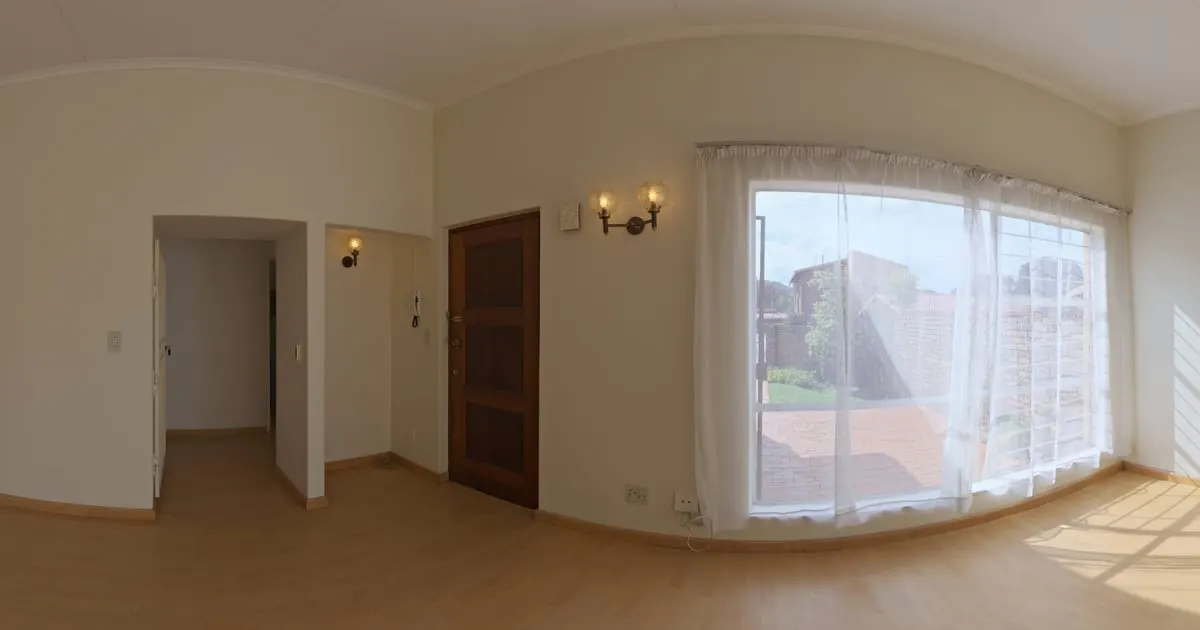
What a 360° virtual tour for real estate is
A 360° virtual tour for real estate is a visit to a property made of panoramic photos of each room, linked to one another. The prospect opens it from the link in the listing, walks from the living room to the kitchen and the bedrooms, and in each space taps points with the price, the square metres, the finishes or the button to schedule the visit.
Each property is its own tour: you unpublish it when it sells or rents and use that slot for the next one.
What your agency gains
- 01
Filter before the visit
Buyers rule a place out or fall in love from their phone. Your calendar fills with visits that end in offers.
- 02
One link per property
Each listing is its own tour: share it on portals, social media and WhatsApp, and measure how many open it.
- 03
Off-plan sales with confidence
For projects under construction, photograph the model unit and link each unit's fact sheet.
- 04
Win more listings
Show owners how you will present their home: a concrete argument to get the exclusive.
How it works for real estate
- 1
Photograph every room
Living room, kitchen, bedrooms, bathrooms, terrace and façade. With the ViewNexo 360 app it takes under an hour per property.
- 2
Connect the rooms
Points at each door lead to the next room, so the buyer understands the real layout.
- 3
Add the fact sheet and the price
Price, square metres, bedrooms and fees on an info point; documents and floor plans as external links.
- 4
Publish and schedule visits
A "Schedule a visit" button asks for date and phone. It reaches the dashboard and your WhatsApp.
What to photograph in your agency
Each scene of the tour is a 360° photo of one space. These are the ones worth having, in the order a visitor would walk them.
- 01
Front or entrance
To place the property and show the parking or the gate.
- 02
Living and dining room
From a spot where the space and the natural light show.
- 03
Kitchen
With counters, cupboards and room for appliances in view.
- 04
Main bedroom
And its bathroom, if it has one, as a separate scene.
- 05
Other bedrooms
One scene per room helps people understand the layout.
- 06
Yard, terrace or balcony
The outdoor space and the view.
- 07
Shared areas
Pool, community room or park, in complexes and buildings.
The interactive points for real estate
Every scene of the tour takes points the visitor taps. These are the ones businesses in this industry use most.
- Scene link
Connected rooms
From the living room to the master bedroom, from the kitchen to the patio: the tour follows the layout.
- Information
Property fact sheet
Price, area, bedrooms, bathrooms, age and service fees on a fixed point.
- Booking
Schedule a visit
Date, time and the buyer's details reach your inbox; you confirm with a message.
- Quote
Ask for more information
A short form for anyone wanting financing, floor plans or reservation terms.
- External link
Plans and documents
Link the floor plan PDF, the portal listing or the project video from the matching point.
Step into the demo agency
A fictional real estate agency. Walk the property, open the fact sheet and try the visit scheduling button.
A fictional real estate agency built to show ViewNexo: buyers walk through each property from their phone before booking a visit. Prices are illustrative.
Open tourWhat it costs: an example on the Professional plan
Each property is a tour, so the plan depends on how many you keep published at once. With the Free plan you try it with 1 property of up to 10 scenes for 3 months. The Starter plan ($19 a month) takes 3 tours of up to 15 scenes. For an active portfolio there are the Professional plan ($39 a month), with 5 tours of up to 30 scenes and 3 team members, and the Business plan ($79 a month), with 25 tours of up to 100 scenes.
Prices in US dollars (USD), per month.
See plans and pricingFrequently asked questions
How many properties can I publish?
Each plan includes a number of tours and scenes per tour; compare them in the pricing section. When a property sells, archive its tour and free the slot.
Can I use photos from a 360° camera I already own?
Yes. Upload the equirectangular panoramas you have, or take new ones with the ViewNexo 360 app for iPhone.
Can buyers see the tour without signing up?
Yes. The tour is public: it opens from a link on any phone or computer, nothing to install.
Can I put the tour on the property portal?
Share the link in the listing description, or embed the tour on your own website with the embed code.
How do I know which properties get the most interest?
The dashboard shows visits and requests per tour, so you know which listings to push first.
Related industries
Other kinds of business that use the 360° virtual tour in a similar way.
- 360° virtual tour for hotels and innsGuests see the exact room, the common areas and the view before booking.
- 360° virtual tour for furniture stores and showroomsCustomers walk the showroom room by room, tap each piece and see price and dimensions.
- 360° virtual tour for car dealershipsCustomers walk the lot, compare cars with prices and book their test drive.
Pricing
The first 3 months are free, no card needed. Move to a paid plan once your tour is bringing in customers; compare each plan’s limits on the pricing page.
Want to see it with your agency?
Message us on WhatsApp and we’ll tell you how businesses like yours do it, or create your account and publish your first tour today.