
Repair shops, oil change and detailing
360° virtual tour for auto repair shopsA workshop that looks tidy earns trust.
A 360° tour of the reception, the bays and the waiting room. Services show their price and the slot is booked from the tour.
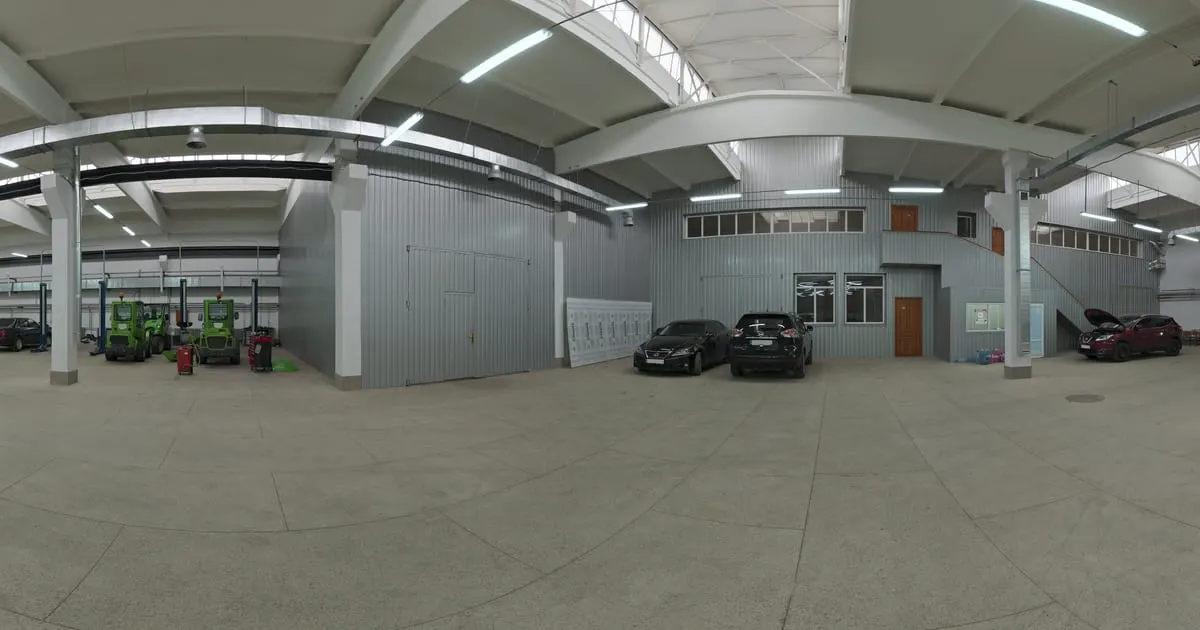
What a 360° virtual tour for auto repair shops is
A 360° virtual tour for auto repair shops shows your facilities in panoramic photos that the customer walks through on their phone before leaving their vehicle. They see the reception, the work bays, the diagnostic equipment and the waiting room, and tap the points with each service (oil change, brakes, alignment) and its price, or the button to book a slot on WhatsApp.
Customers rarely see inside the workshop until the day they arrive; with the tour they get to know it before deciding.
What your workshop gains
- 01
Trust before leaving the car
Seeing the clean workshop, the equipment and the waiting room decides someone comparing two shops.
- 02
Services with clear prices
Oil change, brakes, alignment and inspection as shelves with a starting price.
- 03
Slots without phone calls
The customer books day and time and describes the problem; it reaches your inbox and WhatsApp.
- 04
Tidy quote requests
Requests with photos of the damage and the car's details instead of loose voice notes.
How it works for auto repair shops
- 1
Photograph the workshop
Reception, work bays, diagnostics area and waiting room.
- 2
Connect the zones
Points that lead from reception to the workshop and the waiting room.
- 3
Load the services
Each service is a product with a starting price, estimated time and what's included.
- 4
Turn on slots and quotes
Booking button with day and time; quote form for major repairs.
What to photograph in your workshop
Each scene of the tour is a 360° photo of one space. These are the ones worth having, in the order a visitor would walk them.
- 01
Front and vehicle entrance
To recognise the workshop and know where to drive in.
- 02
Reception
Where the vehicle is received, with the point to book a slot.
- 03
Work bays
Lifts and stations kept tidy, photographed at the start of the day.
- 04
Diagnostic and alignment equipment
The scanner, aligner or balancer that sets you apart.
- 05
Waiting room
With what you offer meanwhile: wifi, coffee, a view of the workshop.
- 06
Parts and lubricants
The counter or rack of products you sell, as a smart shelf.
The interactive points for auto repair shops
Every scene of the tour takes points the visitor taps. These are the ones businesses in this industry use most.
- Smart shelf
Services by type
Maintenance, brakes, suspension, electrical: starting price and estimated time.
- Booking
Book a slot
Day, time, car and problem reach your inbox; you confirm on WhatsApp.
- Quote
Quote a repair
The customer describes the damage and gets the estimate by email or WhatsApp.
- Information
Warranty and brands
Brands you service, labour warranty and hours on a fixed point.
- WhatsApp
Ask before coming
A chat for "do you service my model?" or "how long does it take?".
What it costs: an example on the Free plan
A workshop with reception, three bays, a diagnostic area and a waiting room needs about 6 scenes. The Free plan covers it for 3 months: 1 tour of up to 10 scenes and 10 products for the parts or lubricants you sell at the counter. If you want a separate tour for the oil-change bay or the detailing area, the Starter plan ($19 a month) takes 3 tours of up to 15 scenes and 50 products; with several branches, the Professional plan ($39 a month) covers 3 locations.
Prices in US dollars (USD), per month.
See plans and pricingFrequently asked questions
Do I have to publish prices?
No. You can show "price on request" and receive the quote request instead.
Does it work for oil change or car wash shops?
Yes. Any service with a price fits on a shelf and the slot is booked the same way.
How do I receive the slots?
As a request in the dashboard with an email notice, or on WhatsApp with the message prepared.
Can I show finished jobs?
Yes. A "Jobs" shelf with before-and-after photos, or an external link to your Instagram.
Do I need a website to use it?
No. The tour has its own public link; if you have a website, you embed it with a code.
Related industries
Other kinds of business that use the 360° virtual tour in a similar way.
- 360° virtual tour for car dealershipsCustomers walk the lot, compare cars with prices and book their test drive.
- 360° virtual tour for car rental companiesCustomers see the fleet and the inside of the car before booking, with daily rates.
- 360° virtual tour for phone storesCustomers see the devices with price and stock, and book the repair without calling.
Pricing
The first 3 months are free, no card needed. Move to a paid plan once your tour is bringing in customers; compare each plan’s limits on the pricing page.
Want to see it with your workshop?
Message us on WhatsApp and we’ll tell you how businesses like yours do it, or create your account and publish your first tour today.