
Restaurants, cafés and bars
360° virtual tour for restaurantsLet them pick their table before leaving home.
A 360° tour of your dining room, terrace and bar. Each room shows its menu with prices, and the booking button opens your WhatsApp with the message ready.
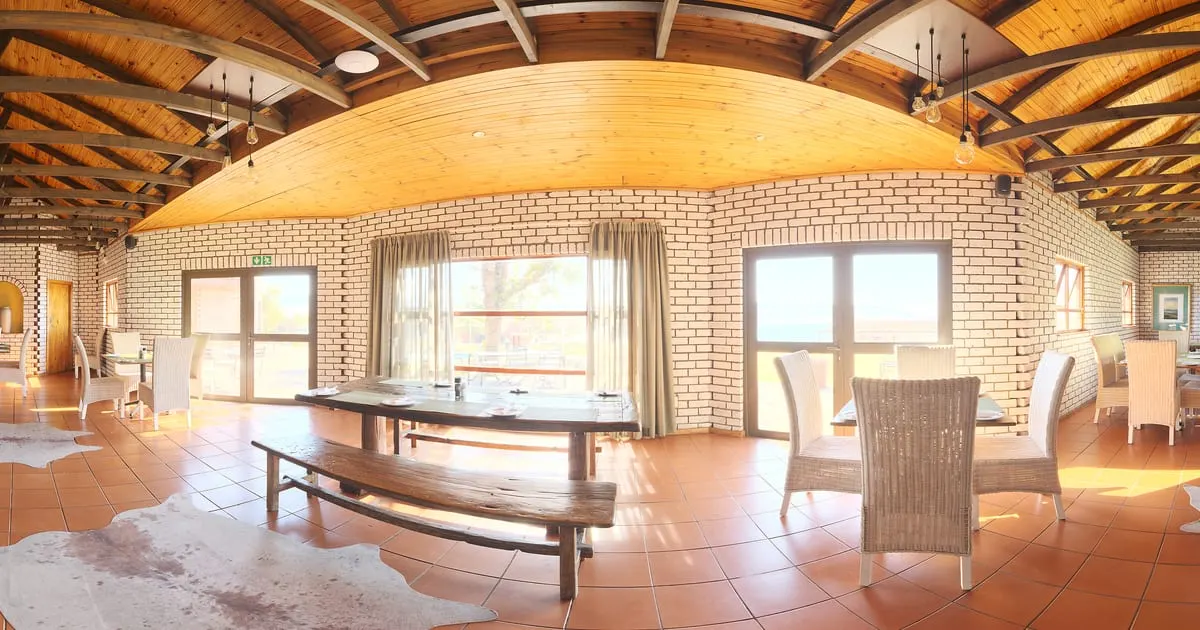
What a 360° virtual tour for restaurants is
A 360° virtual tour for restaurants is an interactive visit to your place made of panoramic photos: the guest steps in from their phone, turns to look around the dining room, moves on to the terrace or the bar and taps the points you placed in each room. Those points open the menu with prices, the booking button or a WhatsApp chat.
It doesn't replace the photos of your dishes: it puts them where they are served. Whoever is choosing where to eat sees the room, the space between tables and the menu in a single visit, with nothing to install.
What your restaurant gains
- 01
Bookings with fewer questions
The guest already saw the room, the terrace and the table by the window. They write to book, not to ask what the place looks like.
- 02
The menu where it tempts
Starters, mains, desserts and drinks as smart shelves in the room where they are served, with today's prices.
- 03
Events and groups without a site visit
Show the private room or the terrace for birthdays and company dinners with one link, and get the quote request in your inbox.
- 04
One link for everything
Google Business, Instagram, your website and the QR code on the door all lead to the same tour, always up to date.
How it works for restaurants
- 1
Photograph every room
Dining room, bar, terrace, private room and open kitchen if you have one. With the ViewNexo 360 app you do it with your iPhone in a quiet afternoon.
- 2
Link the rooms
A point at the door leads from the dining room to the terrace, another to the bar. The visitor walks as if they were there.
- 3
Build the menu as shelves
Create a category per menu section and add it to the matching room. Change prices or daily specials from the dashboard.
- 4
Turn on WhatsApp bookings
Add your number and a message like "I'd like a table for … on …". Publish and share the link.
What to photograph in your restaurant
Each scene of the tour is a 360° photo of one space. These are the ones worth having, in the order a visitor would walk them.
- 01
Entrance and front
The first scene: it helps people recognise the place on arrival and starts the tour.
- 02
Main dining room
From the centre, so the tables, the light and the space between them show.
- 03
Terrace or patio
If you have outdoor tables, photograph them in good daylight.
- 04
Bar
The natural place for the drinks and cocktail menu.
- 05
Private room
For groups, birthdays and company dinners; the quote point goes here.
- 06
Open kitchen or grill
Only if guests can see it and you want to show it.
The interactive points for restaurants
Every scene of the tour takes points the visitor taps. These are the ones businesses in this industry use most.
- Smart shelf
Menu by section
Each menu category is a shelf: the guest taps and sees dishes, description and price.
- Booking
Table booking
A booking button with date, time and party size that reaches your WhatsApp or your requests inbox.
- WhatsApp
Direct WhatsApp
Questions about allergies, kids' menu or parking get answered in a chat.
- Scene link
Walk between rooms
From the dining room to the terrace, from the bar to the private room: points that connect the scenes.
- Quote
Quote an event
A form for groups and celebrations that reaches you with the guest's contact.
What it costs: an example on the Free plan
A restaurant with a dining room, terrace, bar and private room needs about 5 or 6 scenes and a short menu. The Free plan is enough to try it for 3 months: 1 tour of up to 10 scenes and 10 products, enough for the most ordered dishes. For the full menu, the Starter plan costs $19 a month and takes 50 products and tours of up to 15 scenes; if your menu goes past 50 dishes, the Professional plan ($39 a month) reaches 500.
Prices in US dollars (USD), per month.
See plans and pricingFrequently asked questions
Do I need a professional 360° camera?
No. The ViewNexo 360 app for iPhone guides you through the photos and stitches them into a panorama. If you already own a 360° camera, you can upload its photos too.
Can I change the menu and prices whenever I want?
Yes. Dishes live in smart shelves you edit from the dashboard; the tour shows the change instantly, with no new photos.
How do bookings reach me?
Your choice: a button that opens WhatsApp with the message prepared, or a booking form whose notice reaches your email and the dashboard.
Does it work for several locations?
Yes. Each location is a business inside your account with its own tour, menu and WhatsApp number.
Can I put it on my website?
Yes. Every tour has an embed code for your site, plus the public link you share on social media and Google Business.
Related industries
Other kinds of business that use the 360° virtual tour in a similar way.
- 360° virtual tour for hotels and innsGuests see the exact room, the common areas and the view before booking.
- 360° virtual tour for gyms and studiosProspects see the space, the equipment and the plans before asking for a trial class.
- 360° virtual tour for shops and retailAny store with shelves: customers walk, tap the products and buy on WhatsApp.
Pricing
The first 3 months are free, no card needed. Move to a paid plan once your tour is bringing in customers; compare each plan’s limits on the pricing page.
Want to see it with your restaurant?
Message us on WhatsApp and we’ll tell you how businesses like yours do it, or create your account and publish your first tour today.