
Gyms, boxes and studios
360° virtual tour for gyms and studiosLet them see the gym before the first class.
A 360° tour through your rooms, the equipment and the changing rooms. Plans sit where they are seen, and the trial class is booked from the tour.
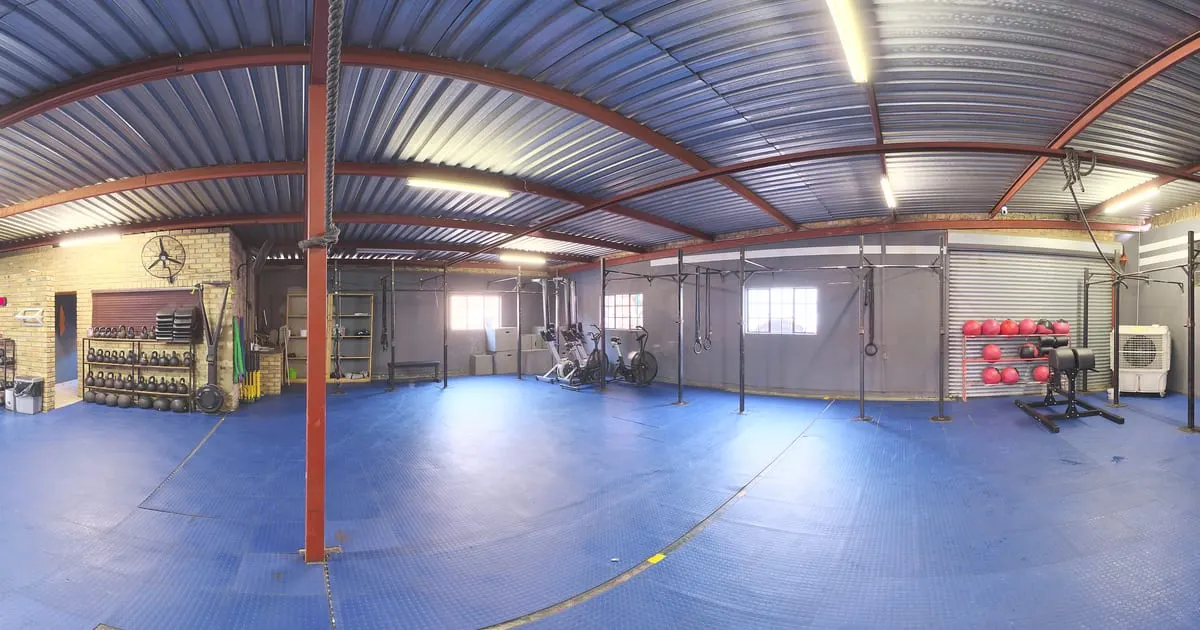
What a 360° virtual tour for gyms is
A 360° virtual tour for gyms is a visit to your facilities made of panoramic photos: someone comparing options walks through the weights room, the cardio area, the class studio and the changing rooms on their phone, and taps the points where you put the plans with their price, the class timetable or the button to book a trial class.
It answers the usual questions before the visit: what equipment there is, how roomy the space is and what the changing rooms are like.
What your gym gains
- 01
Sign-ups with less friction
Someone who already saw the space and the prices arrives at the trial class ready to join.
- 02
Plans and schedules in view
Monthly, quarterly, yearly and drop-in classes as shelves with prices you update whenever you want.
- 03
Confidence for beginners
Seeing the space from home lowers the barrier for someone who never walked into a gym.
- 04
Reviews and social media with one link
Google Business, Instagram and your website lead to the same tour, always current.
How it works for gyms
- 1
Photograph every room
Reception, weights room, cardio, class studio, changing rooms. With the ViewNexo 360 app in one morning.
- 2
Connect the rooms
Points that lead from reception to each room, like the walk-through you give a prospect.
- 3
Add plans and services
Plans, personal training and nutrition as products with price and description.
- 4
Turn on the trial class
The booking button asks for day, time and contact. Publish and share the link.
What to photograph in your gym
Each scene of the tour is a 360° photo of one space. These are the ones worth having, in the order a visitor would walk them.
- 01
Reception
With the plans and prices point in view.
- 02
Weights and machines
One or two scenes, depending on size, so the equipment shows.
- 03
Cardio area
Treadmills, bikes and ellipticals.
- 04
Group class studio
With the class timetable in an information point.
- 05
Functional area or box
Racks, bars and the open space to train.
- 06
Changing rooms and showers
Photographed with nobody in them; a frequent question before signing up.
The interactive points for gyms
Every scene of the tour takes points the visitor taps. These are the ones businesses in this industry use most.
- Smart shelf
Plans and memberships
Prices and what each plan includes, at the reception of the tour.
- Booking
Trial class
Day, time and contact reach your inbox; you confirm on WhatsApp.
- Scene link
Room by room
Weights, cardio, functional, changing rooms: each room connected to the next.
- Information
Hours and rules
Opening hours, group classes and house rules on a fixed point.
- WhatsApp
Ask the trainer
A chat for questions about routines, injuries or corporate plans.
What it costs: an example on the Free plan
A gym with reception, weights, cardio, a class studio and changing rooms takes about 6 to 8 scenes, and its plans (monthly, quarterly, yearly, day pass) fit in a few products. The Free plan covers that case for 3 months: 1 tour of up to 10 scenes and 10 products. For a larger place, the Starter plan ($19 a month) takes 3 tours of up to 15 scenes; for a chain, the Professional plan ($39 a month) covers 3 locations and 30 scenes per tour.
Prices in US dollars (USD), per month.
See plans and pricingFrequently asked questions
Can I show the class schedule?
Yes. An info point shows the schedule; or link your class booking system with an external link.
What if I change the prices?
Edit the shelf in the dashboard and the tour shows the new price instantly.
Does it work for yoga or pilates studios?
Yes. Any space with rooms and plans works the same: studios, boxes, martial arts academies.
How do I receive trial class requests?
On WhatsApp with the message prepared, or as a request in the dashboard with an email notice.
Can I have several locations?
Yes. Each location is a business inside your account with its own tour and contact.
Related industries
Other kinds of business that use the 360° virtual tour in a similar way.
- 360° virtual tour for hotels and innsGuests see the exact room, the common areas and the view before booking.
- 360° virtual tour for restaurantsGuests walk the dining room, open the menu from the tables and book on WhatsApp.
- 360° virtual tour for shops and retailAny store with shelves: customers walk, tap the products and buy on WhatsApp.
Pricing
The first 3 months are free, no card needed. Move to a paid plan once your tour is bringing in customers; compare each plan’s limits on the pricing page.
Want to see it with your gym?
Message us on WhatsApp and we’ll tell you how businesses like yours do it, or create your account and publish your first tour today.