
Phones, accessories and repair service
360° virtual tour for phone storesPrice and stock before they ask.
A 360° tour of your shop and your repair counter. Devices and accessories as shelves with price and stock; repairs with a slot and a quote.
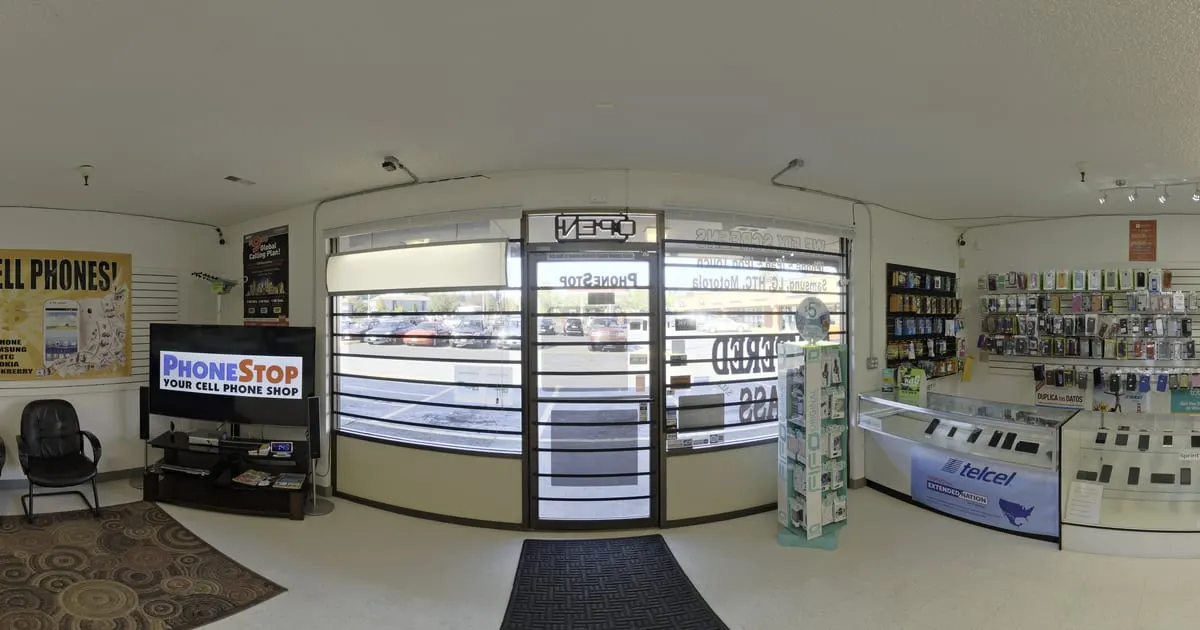
What a 360° virtual tour for phone stores is
A 360° virtual tour for phone stores is your shop and your repair counter in panoramic photos that the customer walks through on their own phone. The display cases are points that open the devices with price, storage, colour and stock; the accessories wall does the same with cases, chargers and earphones, and the repair counter has the button to book a slot or get a repair quote.
Since prices and stock change often, they come from the catalog: you edit them in the dashboard and the tour shows them instantly.
What your phone store gains
- 01
Fewer "how much is it?" chats
Price and stock are on every shelf. The customer writes to buy or reserve.
- 02
Repair service with trust
Show the workshop and the repair area; the slot is booked with model and fault.
- 03
Prices up to date
Change prices and stock from the dashboard or the app and the tour updates instantly.
- 04
One link for Marketplace and social media
Ads lead to the tour with the whole inventory, not to a single photo.
How it works for phone stores
- 1
Photograph shop and workshop
Device display cases, accessories wall, repair service counter.
- 2
Connect the zones
Points that lead from the display cases to the workshop and the till.
- 3
Load devices and accessories
Each display case is a shelf with devices, price, stock and specs.
- 4
Turn on slots and WhatsApp
Slot for repairs, quote for devices on order. Publish and share.
What to photograph in your phone store
Each scene of the tour is a 360° photo of one space. These are the ones worth having, in the order a visitor would walk them.
- 01
Front and entrance
To recognise the shop on the street or in the mall.
- 02
Device display
One scene facing the main display case, with a point per brand or range.
- 03
Accessories wall
Cases, screen protectors, chargers and cables, grouped by type.
- 04
Audio and gadgets
Earphones, speakers and watches, if you sell them.
- 05
Repair counter
With the point to book a slot or ask for a quote.
- 06
Checkout
With payment methods and the store's WhatsApp.
The interactive points for phone stores
Every scene of the tour takes points the visitor taps. These are the ones businesses in this industry use most.
- Smart shelf
Device display cases
Models with price, stock and specs, by brand or by range.
- Booking
Repair slot
Model, fault and time reach your inbox; you confirm on WhatsApp.
- Quote
Quote a device
For devices on order or payment plans, with the customer's contact.
- WhatsApp
Buy on WhatsApp
The chat opens with the device they were looking at.
- Information
Warranty and payment
Warranty, instalments and hours on a fixed point.
What it costs: an example on the Starter plan
A phone store with a display, accessories, a repair counter and a checkout takes about 4 to 6 scenes, but it handles many products. The Free plan lets you try it for 3 months with 1 tour of up to 10 scenes and 10 products. The Starter plan ($19 a month) takes 50 products, enough for the devices and accessories people ask for most; with the full catalog, the Professional plan ($39 a month) reaches 500 products and covers 3 locations.
Prices in US dollars (USD), per month.
See plans and pricingFrequently asked questions
How do I keep prices current?
From the dashboard or the app: change the product's price and stock and the tour updates without republishing.
Can I show the repairs I do?
Yes. A services shelf with a starting price and estimated time, and the slot is booked from there.
Does it work for computer or electronics stores?
Yes. Any product with a price and stock works the same.
How do I receive repair slots?
As a request in the dashboard with an email notice, or on WhatsApp with the message prepared.
Can I have several stores?
Yes. Each store is a business inside your account with its own tour and inventory.
Related industries
Other kinds of business that use the 360° virtual tour in a similar way.
- 360° virtual tour for shops and retailAny store with shelves: customers walk, tap the products and buy on WhatsApp.
- 360° virtual tour for clothing and shoe storesCustomers walk the store, tap the garments and see size, price and stock.
- 360° virtual tour for auto repair shopsCustomers see the workshop, check services with prices and book a slot without calling.
Pricing
The first 3 months are free, no card needed. Move to a paid plan once your tour is bringing in customers; compare each plan’s limits on the pricing page.
Want to see it with your phone store?
Message us on WhatsApp and we’ll tell you how businesses like yours do it, or create your account and publish your first tour today.