
Dealerships and vehicle sales
360° virtual tour for car dealershipsThe lot, open 24 hours a day.
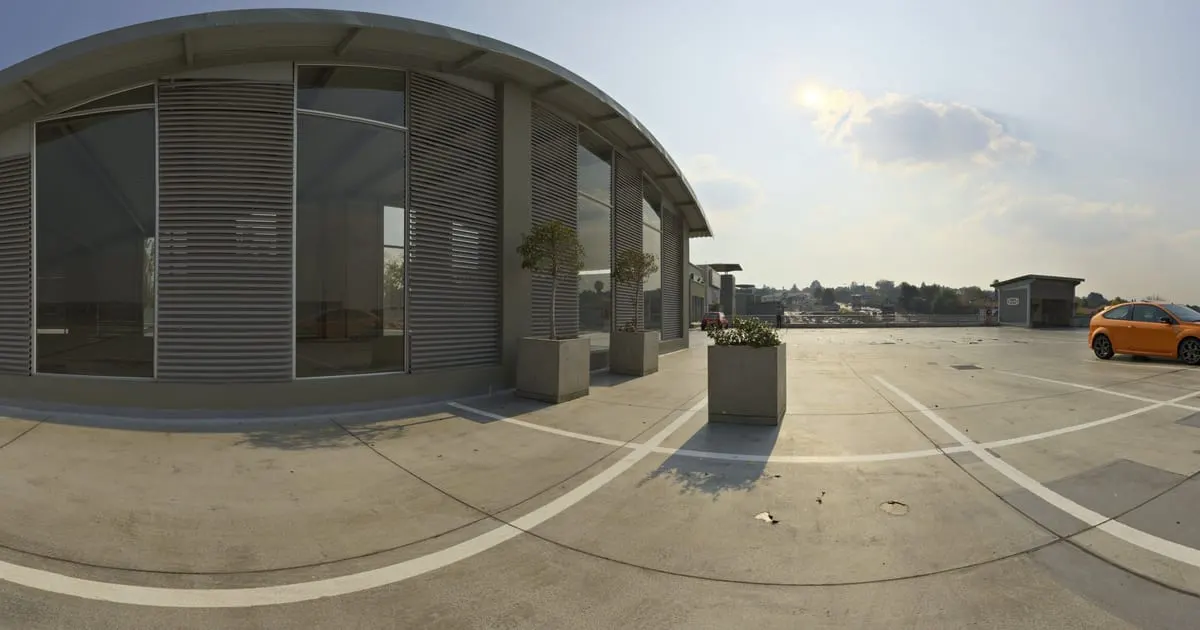
A 360° tour of the showroom and the used-car lot. Every car is a point with price, trim and mileage; the test drive is booked right there.
What a 360° virtual tour for car dealerships is
A 360° virtual tour for car dealerships is a walk through the showroom and the lot made of panoramic photos. The buyer opens it on their phone, walks between the cars and taps each one's point to see trim, year, mileage and price, ask for a financing quote or book a test drive on WhatsApp.
The inventory lives in your catalog, not in the photo: when a car sells you mark it as out of stock and the tour shows it without a new photo.
What your dealership gains
- 01
Customers who arrive decided
They already saw the car, the colour and the price. The visit is to drive it and close, not to browse.
- 02
Inventory always current
Sold a unit? Remove it from the shelf in the dashboard; the tour updates with no new photos.
- 03
Test drives booked
The booking button asks for date, model and phone. It reaches your inbox and the salesperson's WhatsApp.
- 04
One link for campaigns
Facebook, Instagram and Marketplace ads lead to the same tour, and you measure how many open it.
How it works for car dealerships
- 1
Photograph showroom and lot
One panorama per zone: reception, new-car display, used-car lot, delivery bay.
- 2
Connect the zones
Points that lead from the showroom to the lot and back, the way your salesperson would.
- 3
Load the inventory
Each car is a product with price, trim, year and mileage, grouped by brand or by type.
- 4
Publish with test drives
Turn on the booking button and the WhatsApp of the salesperson on duty. Share the link in your ads.
What to photograph in your dealership
Each scene of the tour is a 360° photo of one space. These are the ones worth having, in the order a visitor would walk them.
- 01
Front and access
To recognise the place and see where to park.
- 02
New-car showroom
One scene per group of cars, with room to look around.
- 03
Used-car lot
Several scenes along the lot, so every car sits near a point.
- 04
Inside a car
A 360° photo from the seat shows the dashboard, the space and the finish.
- 05
Delivery and financing
The desk where the deal is closed, with the quote point.
- 06
Workshop and after-sales
If you offer maintenance, show it: it also counts when choosing where to buy.
The interactive points for car dealerships
Every scene of the tour takes points the visitor taps. These are the ones businesses in this industry use most.
- Smart shelf
Cars by category
New, used, SUV, pickups: the customer taps and sees price, trim and features.
- Booking
Test drive
Date, model and contact reach the salesperson; confirm on WhatsApp.
- Quote
Quote financing
A form with desired down payment and term so the salesperson returns the instalment.
- WhatsApp
Talk to a salesperson
A chat that opens with the model they were looking at in the message.
- External link
Spec sheet
Link the brand's official catalogue or the used car's listing.
What it costs: an example on the Starter plan
A dealership with a showroom, a lot and after-sales fits in about 8 to 12 scenes. The Free plan lets you try it for 3 months with 1 tour of up to 10 scenes and 10 products, that is, 10 cars with their details. The Starter plan ($19 a month) goes up to 50 products and tours of up to 15 scenes. With more than 50 units or several branches, the Professional plan ($39 a month) takes 500 products, 3 locations and 5 tours.
Prices in US dollars (USD), per month.
See plans and pricingFrequently asked questions
What happens when I sell a car?
Remove it from the shelf or mark it out of stock in the dashboard. The tour reflects it instantly.
Can I show the inside of each car?
Yes. Take a panorama from the driver's seat and link it from the car's point.
Does it work for motorcycles or machinery?
Yes. Shelves take any product with a price and description: motorcycles, trucks, farm machinery.
How does the salesperson receive requests?
On WhatsApp with a prefilled message, or as a request in the dashboard with an email notice. You can export the contacts.
Can I have several branches?
Yes. Each branch is a business inside your account with its own tour, inventory and contact number.
Related industries
Other kinds of business that use the 360° virtual tour in a similar way.
- 360° virtual tour for car rental companiesCustomers see the fleet and the inside of the car before booking, with daily rates.
- 360° virtual tour for auto repair shopsCustomers see the workshop, check services with prices and book a slot without calling.
- 360° virtual tour for real estate agenciesBuyers walk through each property on their phone and request a visit only if it fits.
Pricing
The first 3 months are free, no card needed. Move to a paid plan once your tour is bringing in customers; compare each plan’s limits on the pricing page.
Want to see it with your dealership?
Message us on WhatsApp and we’ll tell you how businesses like yours do it, or create your account and publish your first tour today.